Three ramps, three middles
We wrote a Python script that takes two endpoint colors and renders three 321 by 121 opaque PNGs from the same pair. The first ramp interpolates the encoded sRGB channel values pixel by pixel. The second ramp decodes both endpoints to linear light, interpolates, and re-encodes to sRGB. The third ramp interpolates in Oklab and converts the result back to sRGB. Every pixel along every ramp uses the same pair of endpoints: #1E5AB4 on the left and #F2C14E on the right.
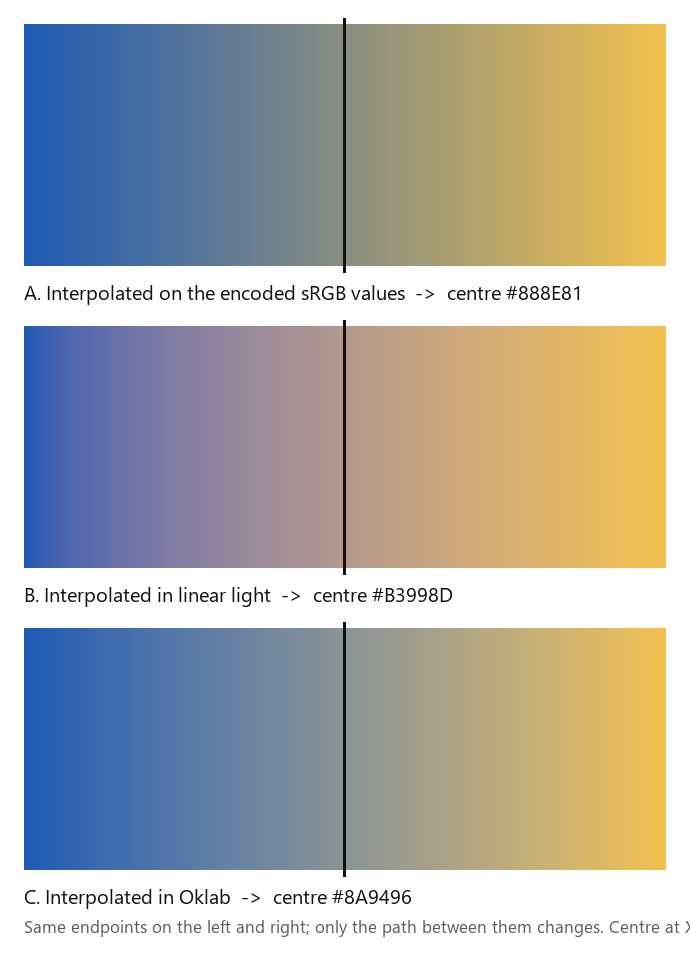
Why the sRGB value matches the average
The plain arithmetic mean of the two encoded endpoints is round(30 + 242) over 2, round(90 + 193) over 2, round(180 + 78) over 2, which gives the triple (136, 142, 129) or #888E81. The first PNG writes the center pixel of the strip by computing the same value: round(R0 + (R1 - R0) times 0.5) equals (R0 + R1) divided by 2 when R1 - R0 is even, which is exactly the case for every channel here. Read back from the saved file, the centre pixel is again #888E81. The two paths agree to zero.
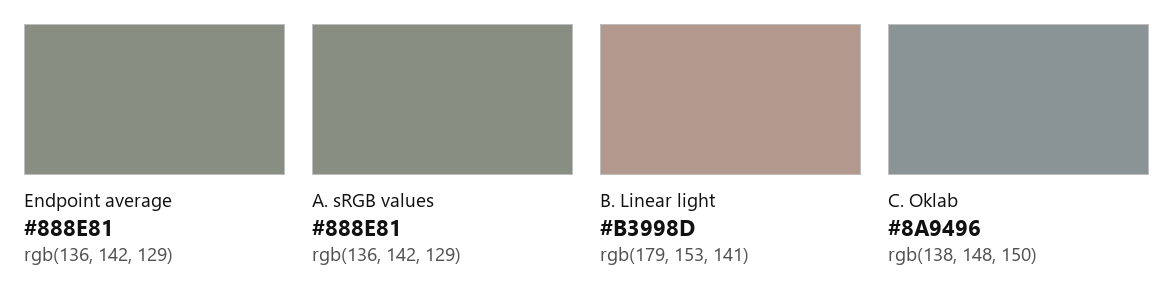
Linear light and Oklab move the centre
The second ramp decodes both endpoints with the sRGB to linear-light curve, interpolates, and re-encodes. With t = 0.5 the red channel is 0.5 times the linear-light sum of 0.01494 and 0.88802, equals 0.45135, which encodes back to 179. Green comes out at 153 and blue at 141, so the centre is #B3998D. The third ramp interpolates in Oklab: convert both endpoints to Oklab, lerp, convert back. The centre reads (138, 148, 150) or #8A9496.
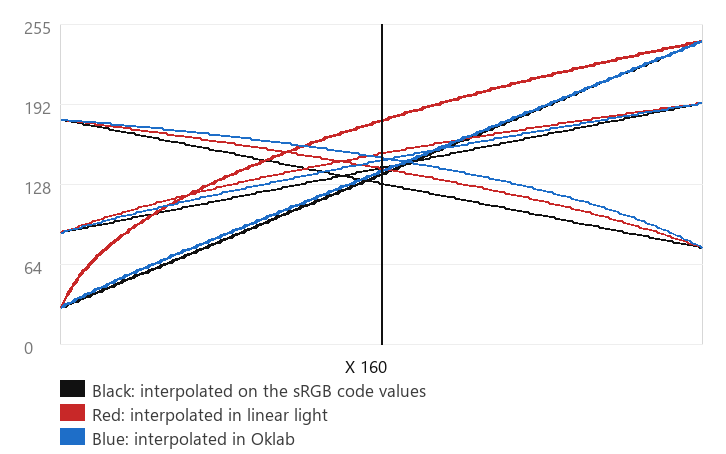
The largest channel difference across the whole 321-pixel strip is 50 out of 255, and it happens between the sRGB ramp and the linear-light ramp at X 79, roughly a quarter of the way across. The sRGB-to-Oklab max is 22 at X 168, just past the centre. Both differences are large enough that a color picker that returns any of these middle pixels would be technically correct, just measuring a different ramp.
Chrome CSS gradient evidence
We tested the same two endpoints in three CSS gradients in the same Chrome that we use to publish these guides. The first uses the default interpolation, the second uses in srgb-linear, the third uses in oklab. We rendered the three boxes at 321 px each, the same width and height as the authored PNGs, then took a screenshot of the page.
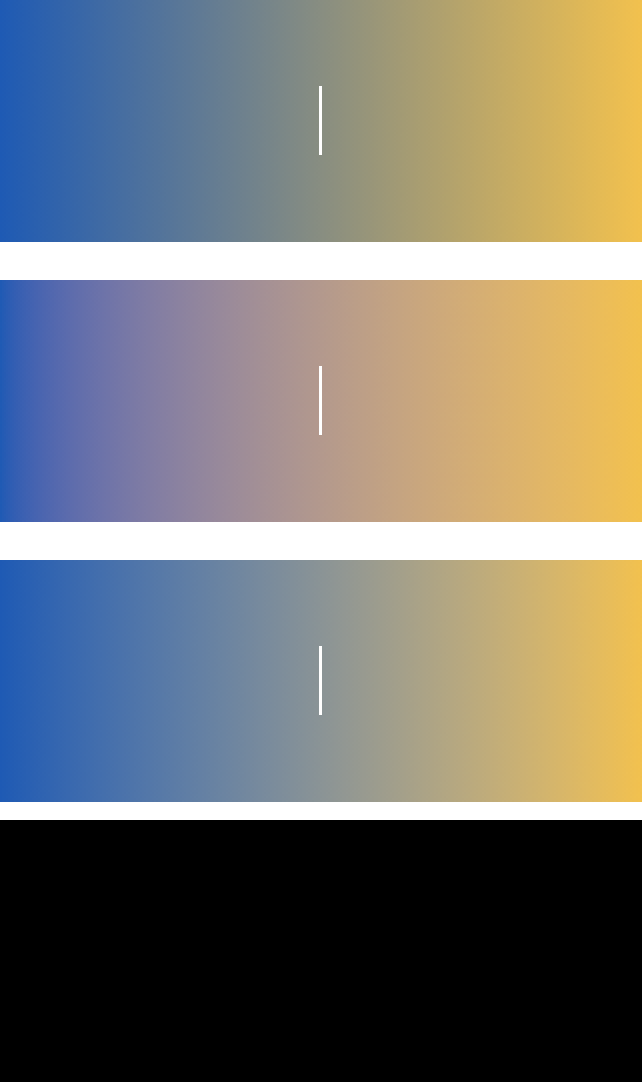
The centre pixel of the default gradient in Chrome reads (136, 141, 129) at one column and (136, 142, 129) at the next. The authored sRGB PNG holds #888E81 exactly. The two agree to within one 8-bit step. The in srgb-linear gradient reads (179, 152, 141) against the authored #B3998D, again within one step. The in oklab gradient reads (138, 147, 149) against the authored #8A9496. Chrome dithers gradients by design; one step is the expected wobble, not a measurement failure.
What this test does and does not check
This experiment uses one endpoint pair, three interpolation paths, and one Chrome window. It does not measure how Photoshop, Illustrator, Procreate, Figma or Roblox render a gradient between the same two colors. It does not test pre-multiplied alpha, color-managed output, wide-gamut displays or HDR pipelines. It does not check any color picker that reads a single source pixel from the gradient image instead of computing the midpoint from the endpoints.
The plain arithmetic mean of two endpoint HEX values is only the middle pixel of a gradient when the ramp interpolates the encoded sRGB channel values. The general distinction between interpolation in sRGB values and interpolation in linear light is described in the CSS Color Level 4 specification. The Oklab equations used here are the same as the spec recommends.
Reproduce locally
- Download the three authored ramps: gradient-srgb-code.png, gradient-linear-light.png, and gradient-oklab.png. Their SHA-256 hashes are in measurements.json.
- Open each one in Pillow and read the pixel at X 160, Y 60. The three centres are #888E81, #B3998D, and #8A9496 in that order.
- Upload gradient-srgb-code.png to the image color picker and click at X 160, Y 60. The reading should match the encoded HEX within the picker's own rounding.
- Open a local HTML page with three boxes that use
background: linear-gradient(to right, #1E5AB4, #F2C14E),linear-gradient(in srgb-linear to right, #1E5AB4, #F2C14E), andlinear-gradient(in oklab to right, #1E5AB4, #F2C14E). Screenshot the boxes at 321 px and read the centre pixel with any image viewer. - If you want to regenerate the PNGs from your own endpoints, run reproduce-gradient.py with Python 3.13 and Pillow 12.3.



The script records the endpoint RGB, the sRGB-code centre, the Oklab centre, and the SHA-256 of each output. To use a different endpoint pair, change the constants at the top of the script and run it again; the centre moves but the relationship between the three interpolation paths does not.
Questions about gradient midpoints
Is the centre of a gradient always the average of the two colors?
Only when the ramp interpolates the encoded sRGB channel values. The default CSS gradient and most pixel-level editors that store the source file as 8-bit sRGB do that. Any ramp that interpolates in linear light, Oklab, or Lab produces a different centre pixel.
Why do my sRGB picks disagree by one step from my gradient export?
Chrome and most browsers dither gradients on 8-bit displays, so adjacent columns can differ by 1 out of 255. That is a renderer decision, not a measurement bug. If you sample a single pixel from the gradient image and round to the nearest 8-bit step, the rounded value matches the channel average to within one step.
Does PickImageColors compute the middle of a gradient?
The current picker reads the single decoded source pixel at the selected coordinate. To measure the centre of a gradient, upload the gradient file and click the column you want to know. The picker does not compute a midpoint or average for you.
Can I use the channel average as an exact answer?
Only when the file you are reading was generated by sRGB-channel interpolation. The plain average of the two endpoint HEX values is a quick sanity check, not a universal truth about how gradients are rendered.
Watch the experiment
Original ramps with synthetic English narration. The measured centre pixels and channel curves remain in this page and in measurements.json.