Eight known source intensities
We created a 160 × 40 TIFF containing eight vertical bars, each 20 pixels wide. The stored values were 0, 1, 255, 256, 32767, 32768, 65280 and 65535. We chose values around boundaries and near both ends of the range so different conversion methods would not always agree.
The file was saved as unsigned 16-bit grayscale. Before opening the website, we reopened it with Pillow, checked its BitsPerSample tag was 16, and read the center of every bar without converting it to RGB. All eight raw numbers matched. This file-level check is separate from the later browser measurements.
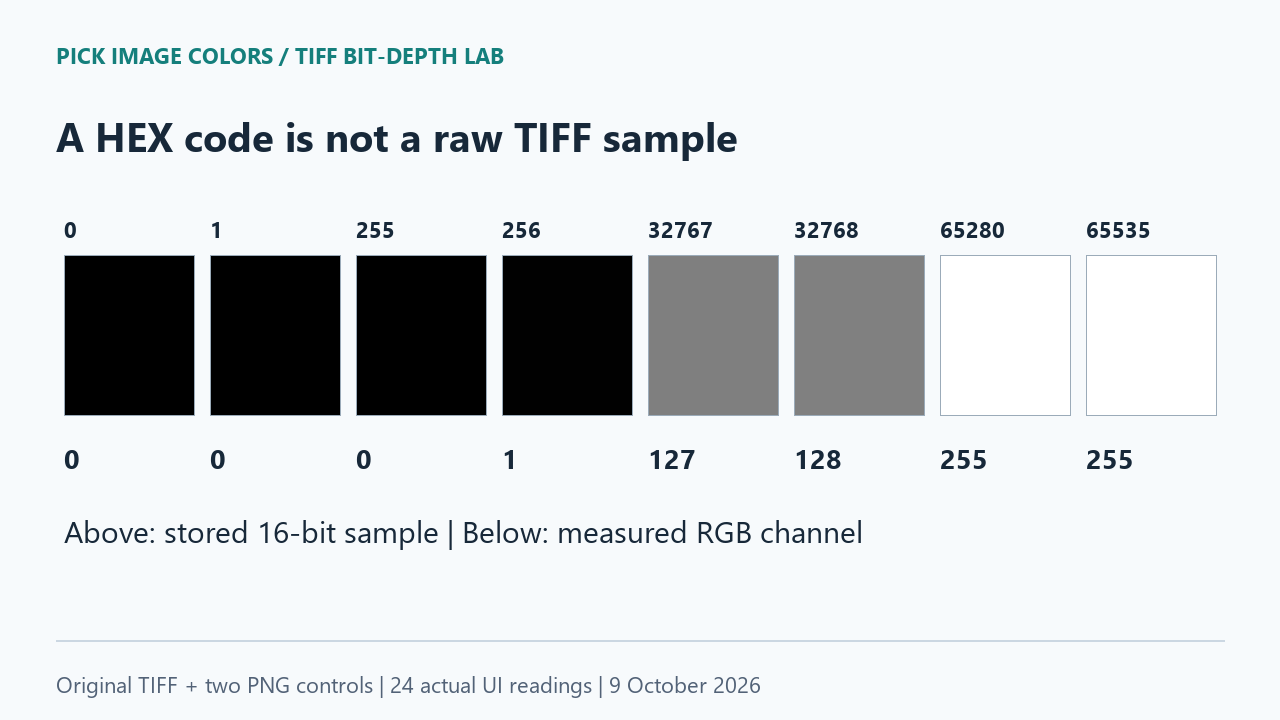
Different samples became the same HEX
We uploaded gray-16bit.tiff to the public picker and clicked the center of each bar at Y 20. It reported 160 × 40 pixels. The first three bars returned #000000 even though their source values were distinct. At the bright end, both 65280 and 65535 returned #FFFFFF. The neighboring middle values 32767 and 32768 remained distinguishable as #7F7F7F and #808080.
These collisions show why a displayed color cannot identify the original integer in this fixture. For example, seeing #000000 does not tell us which of the first three bars supplied it. Converting that HEX back into a larger number would require choosing information that the displayed code no longer contains.
| TIFF raw value | X, Y | TIFF upload | High-byte PNG | Scaled-round PNG |
|---|---|---|---|---|
| 0 | 10, 20 | #000000 | #000000 | #000000 |
| 1 | 30, 20 | #000000 | #000000 | #000000 |
| 255 | 50, 20 | #000000 | #000000 | #010101 |
| 256 | 70, 20 | #010101 | #010101 | #010101 |
| 32767 | 90, 20 | #7F7F7F | #7F7F7F | #7F7F7F |
| 32768 | 110, 20 | #808080 | #808080 | #808080 |
| 65280 | 130, 20 | #FFFFFF | #FFFFFF | #FEFEFE |
| 65535 | 150, 20 | #FFFFFF | #FFFFFF | #FFFFFF |
Every HEX cell in the table was read after a real click in the interface. There were eight positions per file and three files: 8 × 3 = 24 readings. The raw-value column comes from the separate original-file check.
Two controls separated the explanations
Our first PNG control used v >> 8, retaining the high byte of each raw value. The second used round(v × 255 / 65535), scaling to the full 8-bit range and rounding. Each computed value was copied into all three RGB channels. These are deliberately different diagnostic transformations, not claims about the correct conversion for every photograph.
The TIFF readings matched the high-byte control at all eight sampled positions. The scaled-round control differed at two: source 255 produced #010101 instead of #000000, and source 65280 produced #FEFEFE instead of #FFFFFF. Checking only black, white or the middle bars would have missed this distinction.
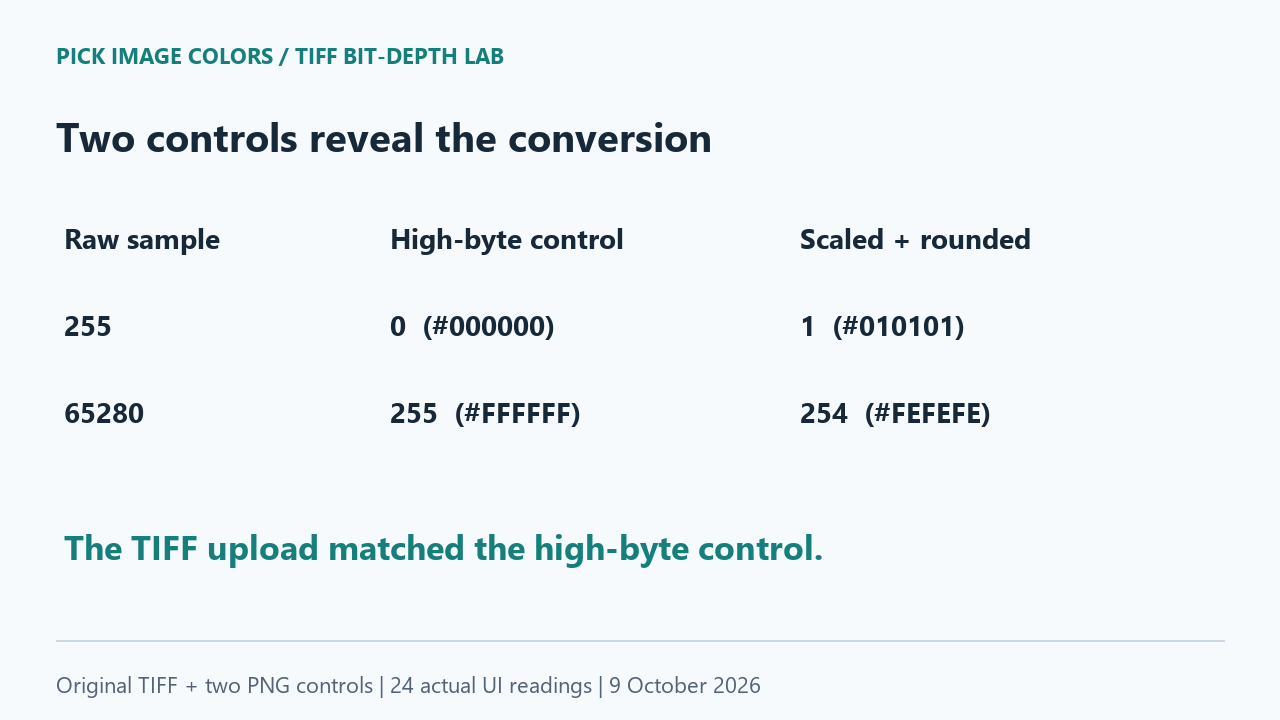
That result is consistent with discarding the low byte for this particular grayscale fixture. It is not proof that every TIFF is converted by the same rule. Our current tool source calls its bundled decoder's toRGBA8 function before the pixel reaches the picker; this is a display conversion path, not a raw-intensity inspector.
Bit depth and display format are separate
Pillow documents I;16 as unsigned 16-bit integer pixels. MDN documents canvas pixel formats including 8-bit RGBA and an optional floating-point format. Those options do not make this picker's existing TIFF conversion lossless. The measured result here belongs to our implementation and file, not a blanket limit on every browser application.
Choose the value you actually need
- For this tool's displayed web color, upload the TIFF and copy its HEX or RGB. Record the filename and coordinates alongside the code.
- To check the original intensity, unpack the lab ZIP and run
check-tiff.pywith Python and Pillow. It reads the TIFF in its original mode and prints the eight stored samples. - To reproduce the conversion comparison, upload both PNG controls separately and click X 10, 30, 50, 70, 90, 110, 130 and 150 at Y 20. Compare the interface results with the table.
- Keep the source TIFF if later numeric analysis matters. Saving the displayed HEX values cannot preserve the distinctions that collapsed in our test.
This experiment covers one uncompressed, single-page, unsigned grayscale TIFF in one Chrome session. We did not test signed samples, multichannel 16-bit data, embedded color profiles, HDR, or every TIFF compression method. It establishes a concrete loss of source distinctions here, without predicting other readers' output.
Questions about TIFF color readings
Does a TIFF extension guarantee a 16-bit reading?
No. Our file's tag and raw readback established its source depth; the website's displayed HEX was a separate converted value.
Can I recover 255 from the black HEX in this test?
Not uniquely. Source 0, 1 and 255 all produced the same #000000 result. Read the source file to distinguish them.
Is this a test of monitor accuracy?
No. We compared stored integers and numeric interface readings. We did not measure emitted light, calibrate a display, or judge the bars by visual appearance.
Watch the bit-depth comparison
Original diagrams with synthetic English narration.